 Block Energy Monitor
Block Energy Monitor
Block Energy MonitorThis control element shows where the electricity in the house is coming from at the moment and where it is going – from the photovoltaics, from the grid and from the battery to the consumers. The charts show generation, consumption, grid import and feed-in of the last hours, days or a whole year, if required with the amounts in euros.
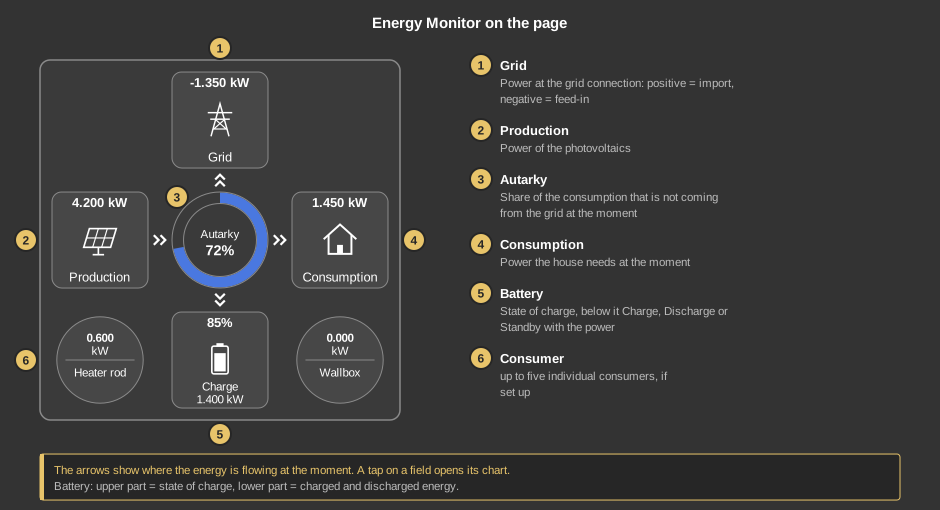
The arrows alternate between single and double every half second, so the energy flow can be seen at a glance. A tap on a field opens its chart – grid, production, consumption, autarky or a consumer. The battery has two tap areas: the upper part opens the course of the state of charge, the lower part the charged and discharged energy.
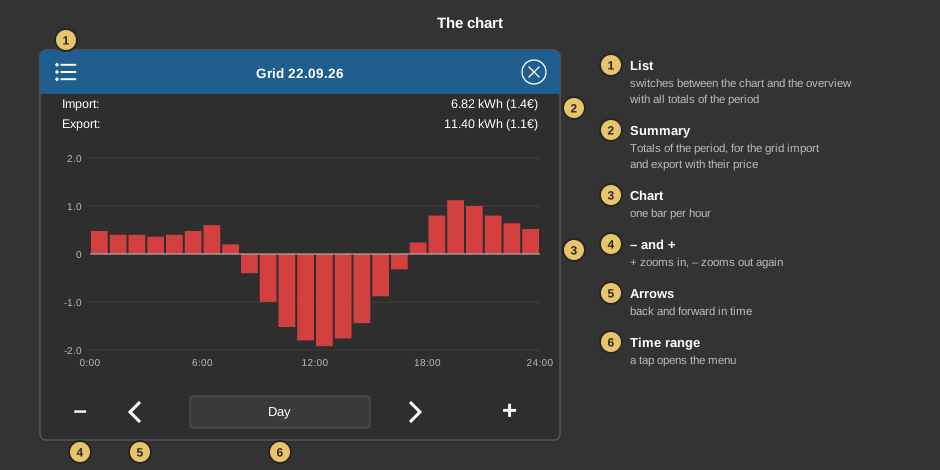
The autarky of a period is weighted with the consumption of the individual hours: a night hour without consumption does not count as much as a midday hour with high consumption.
This section is meant for the installer of the system.
The control element is linked to the function block Block Energy Monitor. The block computes consumption and autarky and records the values once per hour. First create the function block and assign addresses to its inputs and outputs, then right-click the control element and select the function block. The addresses are taken over in the process. Without a link, a tap on the element points this out. See also the notes under Project statistics.
Important: the control element reads the values from the addresses at the inputs and outputs of the block. If an input is only wired internally to another block and has no address, its display stays at 0. Recording the individual consumers also requires an address at the consumer input.
Older recordings. The recording has been revised. Values from the time before are kept, but appear one hour further to the right in the chart; for the state of charge and the autarky they hold the hourly maximum or the middle of minimum and maximum. An offset is therefore visible at the changeover. In addition, the controller only records the grid import separately from the feed-in since the revision. With older recordings or controllers only the balance of each hour is available, which is split into import and export by its sign – a short import in an hour with feed-in disappears in the export.
Whether the battery is charging or discharging is determined by the parameter Battery mode of the block: either by the sign of the battery power (positive = charge, negative = discharge) or by the input Battery status with the values of the parameters Battery status charge and Battery status discharge.
Display |
|
| Battery indicator | Shows the battery at the bottom in the middle. The default is on. When switched off, consumer 5 appears in this place. |
Display consumer |
|
| Text consumer 1 … 5 | Caption of the consumers, a line break is inserted with \n. The default is “Consumer” with the number. Consumer 1 sits at the bottom left, 2 at the bottom right, 3 at the top left, 4 at the top right and 5 at the bottom in the middle (only without the battery indicator). |
The addresses come from the link with the function block and need not be entered by hand. Displayed are:
| Net power kW | Input of the block (grid power), positive = import, negative = feed-in. The arrow appears from 0.1 kW in either direction. |
| PV power kW | Input of the block, the power of the photovoltaics. |
| Consumption kW | Output of the block. If a consumption is linked at the block, it is passed on unchanged, otherwise it is computed from grid, photovoltaics and battery. |
| Battery power kW Battery charge % Battery status |
Optional. Power, state of charge and state of the battery. Not linked: the battery shows 0 % and Standby; with the battery indicator switched off the values are ignored. |
| Autarky % | Output of the block, the share of the consumption that is not coming from the grid at the moment. |
| Display consumer 1 … 5 | Optional. Power of an individual consumer from the input Consumer 1 to 5 of the block. Not linked: the consumer is not shown. |
See also General properties of all control elements.