 Block Contact monitoring
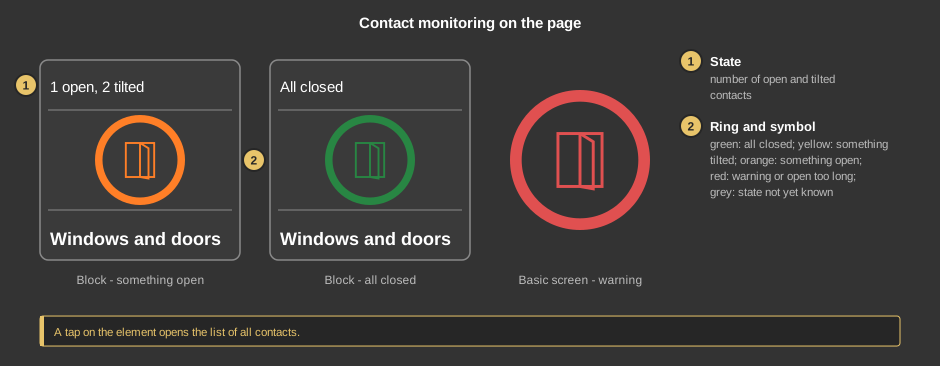
This control element shows at a glance whether a window or a door in the
building is still open or tilted. A tap opens the list of all contacts with
room, state and the time since the last change – handy before leaving
the house or before a thunderstorm.
Operation
- State: the number of open and tilted contacts, for example "1
open, 2 tilted", otherwise All closed or Unknown while the
state of a contact is not yet known.
- Ring and symbol have the same colour:
- green: all closed,
- yellow: something is tilted,
- orange: something is open,
- red: a warning is pending – for instance open during
absence, rain or frost – or a contact has been open longer than
intended,
- grey: the state of at least one contact is not yet
known.
As a circle (basic screen) the element only shows ring and symbol. A tap on
the element opens the list.
The list of contacts
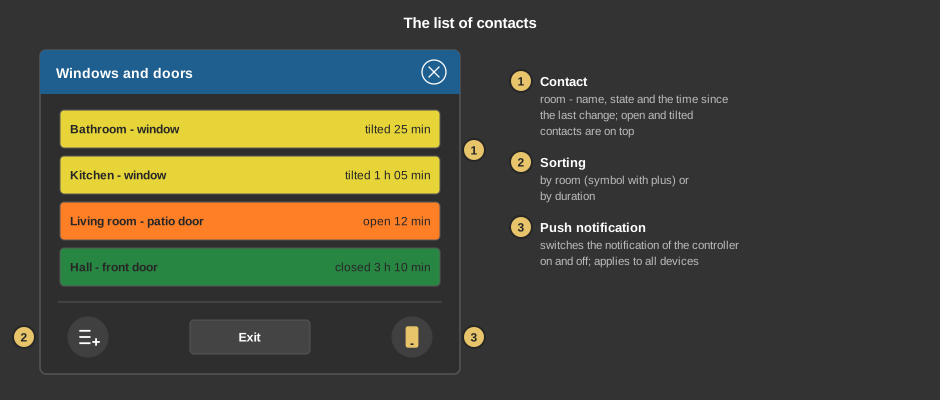
- Contact: each row shows room and name, on the right the state and
the time since the last change; it keeps running in the display. The
colour is that of the ring. Open and tilted contacts are always on top. If
the list is longer than the window, it is moved by dragging or with the
mouse wheel.
- Sorting: toggles between by room (symbol with plus sign)
and by duration – then the contact unchanged for the longest
time is on top.
- Push notification: switches the notification of the controller to
the phone on and off. The setting belongs to the controller: it applies to
all devices and survives a restart.
Exit closes the list.
Setup
This section is meant for the installer of the system.
The evaluation runs in the
function block Block
Contact monitoring; the control element only displays it. First create
the function block and its addresses, then right click on the control
element and select the function block. In the same menu Take comment
takes over the name of the function block as text.
- Which contacts are monitored, with room, name and type, is set in the
contact list at the function block. The warnings and the times for "long
open" are set there too.
- The list of contacts comes directly from the controller and does not run
via addresses.
Parameters
| View |
Block, Basic screen or List
– as a list entry the text is on the left and the ring on the
right. |
| Text |
Caption of the tile and title of the list, default
Fenster und Türen. Its size scales with the element, a line
break is inserted with \n, two lines at most. |
Address links
The addresses Status, Number open and Number tilted
sit at the function
block and are taken over when linking.
See also General properties of all
control elements.