 Block Roller shutter/Blinds safety
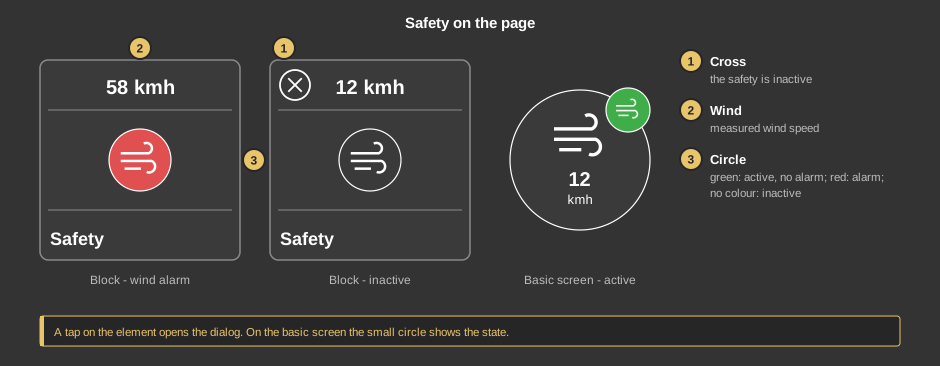
This control element operates the protection of roller shutters and blinds
against storm and, on request, rain. When the wind gets too strong, the
shutters move to a safe position and are locked until the weather has calmed
down. The tile shows the measured wind speed and whether an alarm is
pending.
Operation
- Cross: the switch is set to Inactive. The protection itself
still remains in effect, see below.
- Wind: the measured wind speed in km/h.
- Circle: green when the switch is set to Active and no alarm
is pending, red on an alarm caused by wind or rain, no colour when
the switch is set to Inactive.
As a circle (basic screen) the wind speed is shown in the middle; the small
circle at the top right shows the state in the same colours or the cross. A
tap on the element opens the dialog.
The dialog
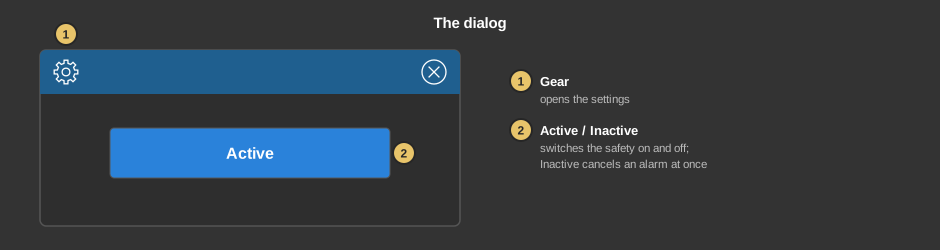
- Gear: opens the settings, see below.
- Active / Inactive: every tap toggles and acts at once. The
protection is always in effect – switching to Inactive only
cancels a pending alarm and the lock of the shutters once. The next wind or
rain value above the threshold triggers the alarm again.
Settings
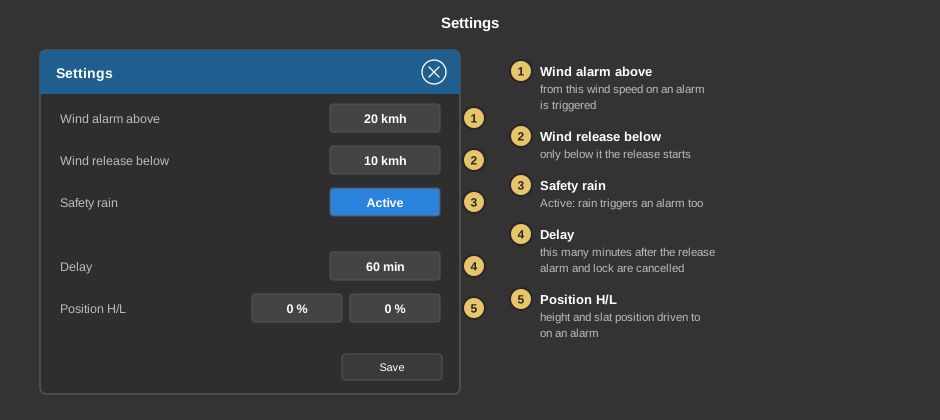
- Wind alarm above: when the wind reaches this speed, an alarm is
triggered. Default 20 km/h.
- Wind release below: only when the wind has dropped to this value
or below does the release start; further wind values below the threshold do
not restart the delay. While the wind is between release and alarm
threshold, the alarm remains and a running delay is discarded. The default 0 km/h only releases when there is no wind at
all – enter a suitable value here.
- Safety rain: with Active a rain message triggers the alarm
too. Default Inactive.
- Delay: this many minutes after the release has started, alarm and
lock are cancelled. Default 60 minutes.
- Position H/L: height and slat position in percent driven to on an
alarm. Default 0 % each.
Save transfers the settings to the controller.
Setup
This section is meant for the installer of the system.
The control element is linked to the
function block Block
Roller shutter/Blinds safety: first create the function block and its
addresses, then right click on the control element and select the function
block. In the same menu Take comment takes over the name of the
function block as text.
- On an alarm the function block sends the position H/L to all its outputs
for height and slat and repeats it every 10 seconds while the alarm is
pending. After the parameter Delay actuator lock it also sets the
actuator lock.
- Switching between Active and Inactive works via the address
Active at the function block; without it the button in the dialog
has no effect. Changing to Inactive only cancels a pending alarm and the
actuator lock, monitoring continues.
Parameters
| Text |
Caption of the tile, default Safety. Its size
scales with the element, a line break is inserted with \n, two
lines at most. |
| View |
Block or Basic screen. |
Address links
The addresses Active, Wind, Alarm and Lock
actuator sit at the
function block and are
taken over when linking.
See also General properties of all
control elements.