 Block Alarm memory basic
Block Alarm memory basic
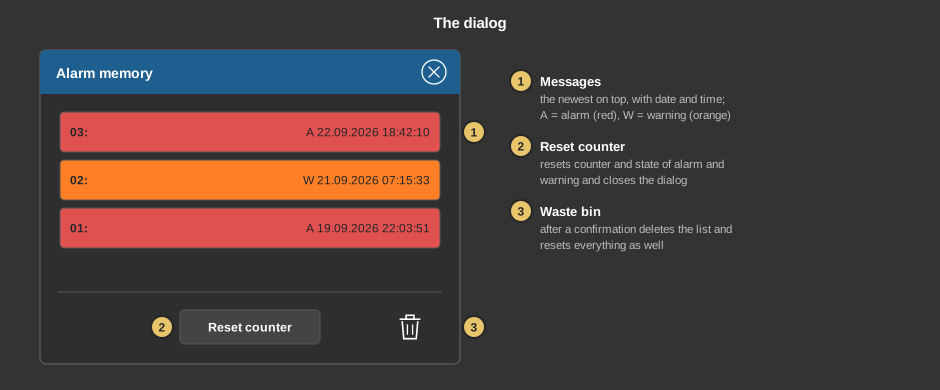
Block Alarm memory basicThis control element shows at a glance whether an alarm or a warning is pending or has been pending – for instance from a water detector or a fault message of the heating. It counts the alarms and warnings, keeps a list with date and time and can be reset once the cause has been dealt with.
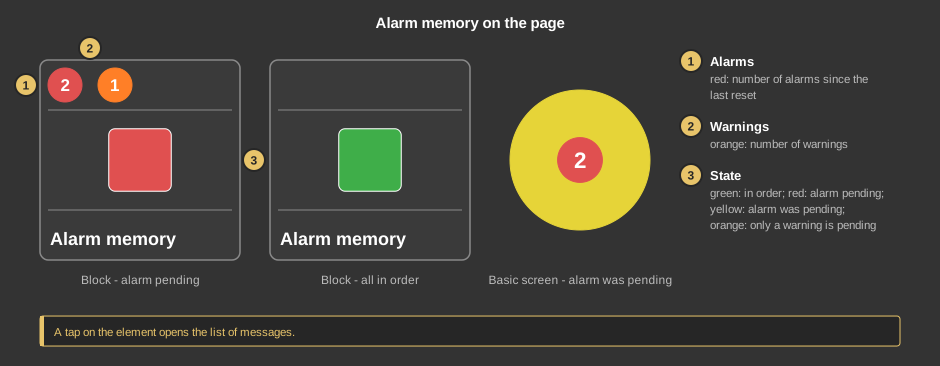
As a circle (basic screen) the whole circle has the colour of the state, the number of alarms is shown in the middle. A tap on the element opens the dialog.
This section is meant for the installer of the system.
The evaluation runs in the function block Block Alarm memory basic; the control element only displays it. First create the function block and its addresses, then right click on the control element and select the function block. In the same menu Take comment takes over the name of the function block as text.
Display |
|
| View | Block or Basic Screen. The third choice List (deprecated) comes from older projects and should no longer be used. |
| Text | Caption of the tile and title of the dialog, default Alarmspeicher. Its size scales with the element, a line break is inserted with \n, two lines at most. |
All addresses – alarm and warning, each with trigger, reset, status and count – sit at the function block and are taken over when linking.
See also General properties of all control elements.